Old Paper PNG Templates 3: Authentic Texture for Modern Design
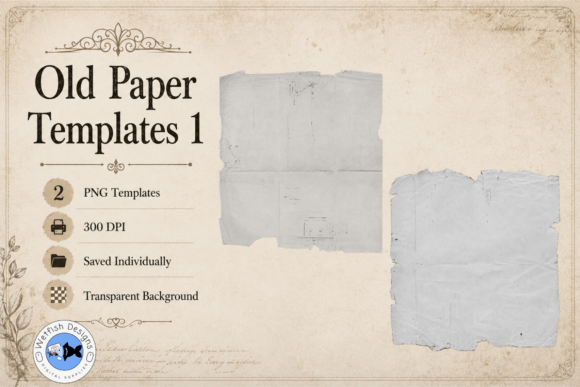
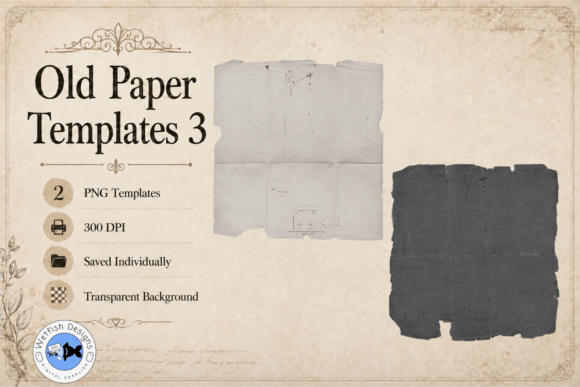
In a digital world saturated with crisp, clean lines and perfect gradients, there's a powerful pull toward the tangible, the imperfect, and the aged. We crave designs that tell a story, that feel like they have a history. This is the core appeal of Old Paper PNG Templates 3. These aren't just digital files; they are versatile design assets crafted to inject soul, texture, and a sense of timelessness into your creative work. The set includes two meticulously designed grayscale PNG templates, each featuring the subtle imperfections that make old paper so captivating: uneven worn edges, faint creases, ghostly fold lines, and a rich, distressed texture that feels genuinely weathered.
More Than a Background: A Foundation for Authenticity
The true strength of these templates lies in their transparency and grayscale format. Unlike a static background image, a transparent PNG paper template acts as a dynamic layer. You can place it over any colored or patterned background, clip text and images to it, or use it as a blending mode to age a modern design. Because they are grayscale, recoloring is simple. A few adjustments in your design software can make the paper appear as a warm, antique parchment, a cool, slate-toned document, or even a vibrant, dyed textile. This flexibility makes Old Paper PNG Templates 3 an indispensable part of a modern design toolkit, bridging the gap between digital creation and analog feel.
Think about the practical applications. For a brand identity project for a boutique coffee roaster, using one of these templates as a subtle texture behind a logo or on packaging can communicate craftsmanship and tradition far more effectively than a flat color. In editorial design, such as a magazine feature on history or travel, these textures can ground photography and typography, adding a layer of visual interest and context. They are perfect for creating cohesive printable papers for journals, tags, and labels that need to look authentically vintage when printed.
Practical Integration into Your Creative Workflow
Incorporating these assets is straightforward. After downloading the digital files, you can open the PNG templates in any compatible design software like Photoshop, Affinity Photo, Procreate, or even Canva. Here’s how to get the most out of them:
- As a Direct Layer: Simply place the template over your design and experiment with layer blending modes like Multiply, Overlay, or Soft Burn to see how the texture interacts with your underlying content.
- As a Clipping Mask: This is where the magic happens. Place a solid color layer or a photo above the paper template, then create a clipping mask. The texture of the old paper will be applied directly to your content, giving it an instant aged effect.
- For Print Projects: The 300 DPI resolution ensures crispness when printed. Use them to create backgrounds for heritage scrapbook layouts, vintage-style wedding invitations, or distressed labels for product packaging.
The key to using these effectively is restraint. You rarely want the texture to overwhelm your main message. Instead, use it to enhance the mood. Lower the layer opacity to let the texture whisper rather than shout. Combine it with appropriate typography—a serif font or a classic script font often pairs beautifully with an aged paper feel, reinforcing the vintage aesthetic.
Evaluating Fit and Ensuring Professional Results
Before diving into a project, consider the narrative you want to build. Old Paper PNG Templates 3 excel in projects where history, nostalgia, authenticity, or organic quality are key themes. They are ideal for:
- Digital Scrapbooking & Junk Journals: Creating layered, textured pages that mimic the feel of a physical book.
- Social Media Graphics: Designing quote cards, announcements, or story backgrounds that stand out in a feed with their tactile quality.
- Web Design Elements: Using them subtly for website backgrounds or section dividers to add depth and character, especially for brands with a rustic, artisanal, or boutique positioning.
- Content Creation: Enhancing blog post graphics, YouTube thumbnails, or podcast cover art with a unique, non-generic background texture.
When testing font pairings, contrast is your friend. Pair the textured, organic paper with a clean, modern sans serif font for headlines to create a striking balance between old and new. Or, lean fully into the vintage vibe with a complementary handwritten font. Always check readability; ensure your text has sufficient contrast against the textured background, especially at smaller sizes. The grayscale nature of the templates makes this easier, as you can adjust the paper's darkness to suit your chosen text color.
Since this is a digital download, you have immediate access to start experimenting. The files are saved individually, giving you precise control over which texture you use where. For designers, crafters, and entrepreneurs, these templates are more than just another asset—they are a shortcut to adding professional, evocative texture that connects with an audience on a sensory level. They transform flat digital designs into pieces with perceived depth and history, making your work more memorable and engaging. In the quest for authentic digital creation, having a resource like Old Paper PNG Templates 3 in your library is a strategic advantage.