Elevate Your Visuals: Mastering 8x10 Landscape Photo Collage Templates
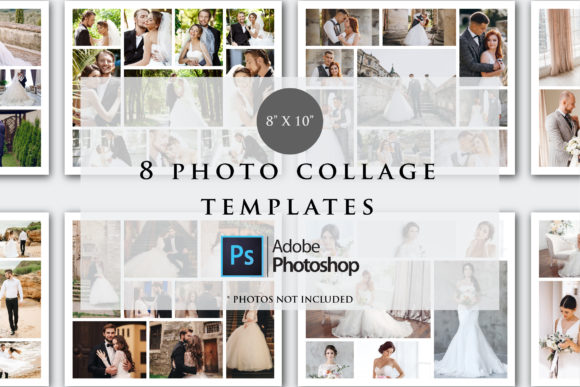
Every photographer, graphic designer, and content creator eventually hits a wall when arranging images. You have a collection of stunning photos—whether from a wedding, a product shoot, or a vacation—but arranging them into a cohesive, professional layout feels like a puzzle missing pieces. This is where the utility of high-quality 8x10 Landscape Photo Collage Templates becomes undeniable. These aren't just random boxes slapped together; they are precision-engineered design assets that serve as the structural backbone for your visual storytelling. When you utilize a set of 8 PSD files specifically calibrated for an 8x10 landscape orientation, you are investing in a workflow that prioritizes both efficiency and aesthetic appeal.
The Architecture of Visual Harmony
Understanding the technical specifications of these templates is the first step toward mastering them. Sized at 8 by 10 inches with a landscape orientation, these files are built for standard framing and high-quality printing. The 300 DPI resolution ensures that your images remain sharp and pixel-perfect, a non-negotiable requirement for professional print design and packaging design. Furthermore, the RGB color mode offers a vibrant color spectrum, making these templates versatile enough for both digital displays and modern printing presses.
However, the true value lies in the "PSD" format. Unlike static image editors, these Photoshop templates utilize Smart Objects. This feature allows you to swap out placeholder images with your own photographs non-destructively. As a creative professional, this means you can experiment with different images within the same layout without ruining the underlying structure. The layer-based architecture gives you control over shadows, borders, and background textures, allowing you to tailor the visual hierarchy to match your specific project needs.
Practical Applications for Modern Creators
The versatility of an 8x10 Landscape Photo Collage Template extends far beyond simple scrapbooking. For the small business owner or entrepreneur, these templates are a secret weapon for social media graphics and brand identity. Imagine a real estate agent showcasing a property tour in a single, digestible image, or a restaurant owner displaying a "Chef's Special" menu item alongside its ingredients. The landscape format naturally mimics the aspect ratio of most screens, making it ideal for web design headers and blog post featured images.
For marketers and publishers, consistency is key to recognition. Using a standardized set of templates ensures that your visual content maintains a uniform look across different platforms. This consistency builds trust with your audience. When a viewer sees a well-organized collage on Instagram, they expect the same level of professionalism on your website. These templates facilitate that consistency without requiring hours of manual alignment in Adobe Photoshop.
Design Strategy and Implementation
While the templates provide the structure, the strategy comes from how you use them. A common mistake is overcrowding the space. Just because a template has eight photo slots doesn't mean you have to use them all. Effective editorial design often relies on negative space to let the content breathe. If you are creating a mood board for a client, you might leave some slots filled with solid brand colors or texture overlays rather than photos. This technique creates a rhythm that guides the viewer's eye across the canvas.
Another critical consideration is the relationship between the images. The best photo collage designs tell a story through the sequence of photos. Consider the lighting and color temperature of your source images. If you are mixing warm, golden-hour shots with cool, clinical studio product photos, the result can feel disjointed. Use the adjustment layers often included in premium PSD files to color-grade your images collectively, ensuring they look like they belong in the same family.
Technical Requirements and Workflow Optimization
It is vital to acknowledge the ecosystem required to use these assets effectively. As noted in the product specifications, Photoshop CC is required. This is not a limitation but a feature. The complexity of a high-resolution, multi-layered collage file demands the processing power and feature set of the desktop version of Photoshop. Attempting to recreate this level of detail on a mobile app or a simplified online editor would result in a loss of quality and control.
For those new to working with zipped files and software requirements, the process is straightforward but necessary. You will need a utility like WinZip or WinRAR to extract the PSD files from the download folder. Once extracted, the workflow is seamless: open the file, locate the Smart Object layers (usually clearly labeled), double-click to open them, paste your photo, and save. The template automatically applies the correct perspective, masking, and effects to your image. This process transforms a task that could take an hour of manual cropping and masking into a five-minute edit.
Elevating Brand Perception
Ultimately, the tools you choose reflect the standard you set for your brand. In a crowded digital landscape, generic, poorly aligned graphics get scrolled past. A polished, cohesive collage suggests a level of care and professionalism that resonates with viewers. Whether you are a blogger sharing travel recaps, a crafter selling handmade goods, or a designer pitching a concept to a client, the presentation is half the battle.
By integrating these 8x10 landscape templates into your workflow, you are not just arranging photos; you are curating an experience. You are taking control of the visual narrative and ensuring that your message is communicated clearly, beautifully, and professionally. The time saved on technical execution is time gained for creative thinking, allowing you to focus on the story you want to tell rather than the pixels you need to align.