Mastering Resume/CV PSD Design Templates Vol 172
The Anatomy of a Modern Professional CV
First impressions in the job market are rarely verbal; they are visual. Before a recruiter reads a single bullet point about your experience, they are reacting to the layout, typography, and hierarchy of your document. This is where the Resume/CV PSD Design Templates Vol 172 enters the conversation. It is not merely a collection of boxes and text fields; it is a structured approach to professional branding. In a competitive landscape where visual communication skills are valued across every industry, having a document that reflects modern design assets is essential.
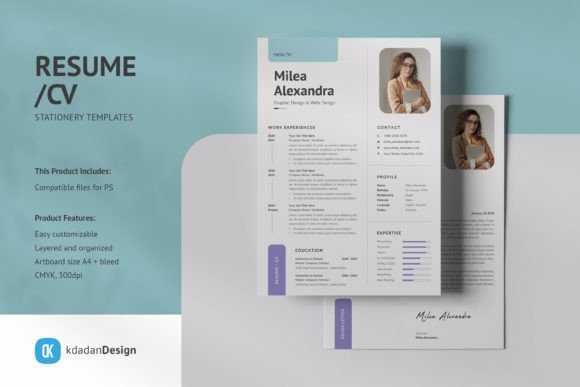
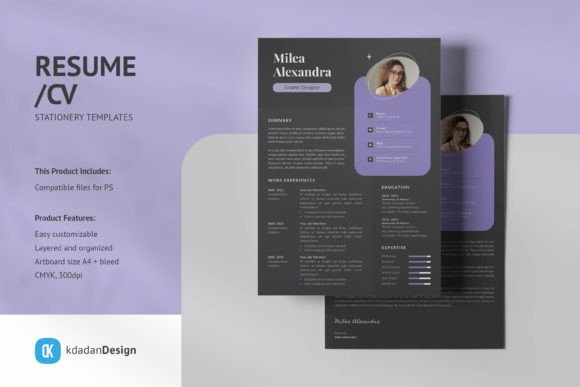
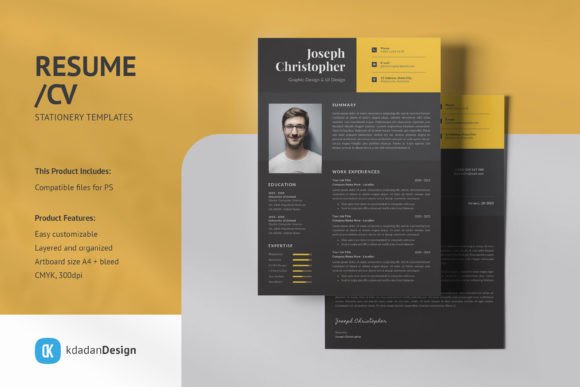
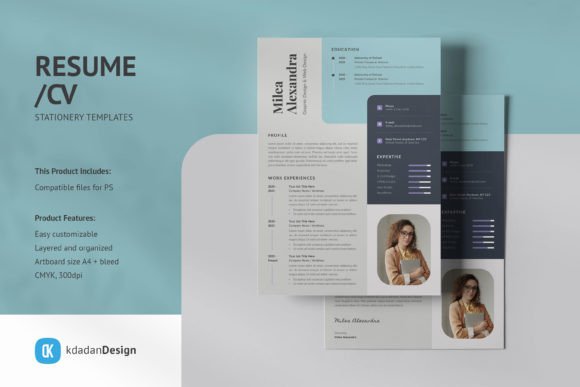
The defining characteristic of this template is its "Clean, Modern and Professional" aesthetic. In design terms, this usually translates to generous negative space, a strict grid system, and a balanced composition that guides the eye naturally from the header to the skills section. Unlike cluttered templates that try to cram too much information onto the page, Vol 172 prioritizes readability. It creates a calm, authoritative presence on the page. This style avoids fleeting trends that might look dated in six months, focusing instead on timeless modern typography and layout principles that suggest stability and competence.
Strategic Customization: Beyond Simple Text Replacement
The true value of Resume/CV PSD Design Templates Vol 172 lies in its architecture as a PSD template. For anyone using Adobe Photoshop, this offers a level of granular control that online resume builders simply cannot match. The description notes that text, images, and graphics are on separate layers. This is crucial for maintaining visual hierarchy. You can adjust the weight of a heading, change the color of an icon, or resize a photo container without disrupting the rest of the layout.
A standout feature here is the use of Smart-Objects for image containers. In practical terms, this saves immense time and prevents image distortion. If you are a photographer, designer, or content creator, your headshot is part of your brand identity. With Smart-Objects, you simply double-click the layer, paste your image, save, and the template automatically crops and fits it to the designated space. This technical feature ensures that your logo design elements and personal imagery remain crisp and professional.
Optimizing Visual Hierarchy and Readability
A resume is a functional piece of editorial design. Its primary goal is information transfer. The layout of Vol 172 supports this by establishing a clear visual hierarchy. This means the most important information—usually your name and current title—is given the most prominence, while secondary details like references or specific software skills are organized logically below. When you utilize this template, you are leveraging a pre-tested structure that balances white space with content density.
Typography plays a massive role in this balance. The template recommends specific free fonts to complement the design. When selecting your final typeface, consider the personality you want to project. A clean sans serif font often conveys innovation and efficiency, making it popular in tech and web design. Conversely, a traditional serif font can suggest heritage and reliability, often preferred in law or academia. The key is consistency. Using the same typographic rules throughout your CV, cover letter, and portfolio creates a cohesive package.
Print Perfection vs. Digital Versatility
One of the technical specifications worth noting is the artboard size A4 + bleed and CMYK, 300dpi settings. This indicates that the template is print ready. For many job seekers, this is a non-negotiable requirement. Handing a crisp, physical copy of your CV in an interview still carries weight. The inclusion of bleed lines ensures that if you use colored backgrounds that extend to the edge of the paper, there will be no unprinted white edges after trimming.
However, the utility of Resume/CV PSD Design Templates Vol 172 extends beyond the printer. While designed for print specifications, these files are easily adapted for digital distribution. You can export sections of the design for social media graphics (like a LinkedIn banner) or save a flattened version as a PDF for email. The CMYK color mode ensures that what you see on your calibrated screen is what you get on paper, but for purely digital use, you might choose to convert the file to RGB to make the colors pop on screens.
Practical Application for Diverse Professionals
The versatility of this template makes it a strong candidate for various professionals. It functions as a premium font and layout solution for those who need to stand out without being loud.
- Graphic Designers & Creatives: Use the Smart-Objects to showcase a portfolio thumbnail or a personal logo. The clean layout ensures your work samples don't compete with the text.
- Entrepreneurs & Small Business Owners: When pitching to investors or partners, a professional CV acts as a biography. The professional resume format lends credibility to your personal history.
- Marketers & Content Creators: Demonstrate your understanding of brand identity by treating your resume as a marketing document. Use the separate layers to highlight key metrics or campaign successes.
When you download the template, the first step should be evaluating project fit. Does the visual style match the industry you are applying to? A highly creative, colorful template might work for a fashion role but could be distracting for a corporate finance position. Vol 172 strikes a middle ground, offering a modern typography look that is adaptable to both creative and corporate environments.
Finalizing Your Design Assets
Before finalizing your document, take advantage of the layer structure to test different font pairings. While the Help Files provide guidance, you might find that swapping a sans serif font for a script font in the header adds a touch of personality that suits a wedding planner or boutique owner better than a standard blocky type. Always review the readability considerations; ensure that your text size is legible and that there is enough contrast between the text and the background.
Finally, remember that while the mockup not included and model images are for presentation, the actual design is yours to own. By downloading the recommended fonts and utilizing the editable PSD template, you are not just filling in blanks; you are curating a professional presentation. Resume/CV PSD Design Templates Vol 172 provides the framework, but your experience and customization bring it to life, ensuring you make a lasting impact on your next opportunity.