Design Like a Pro: Canva Pinterest Templates for Instant Impact
There’s a specific kind of frustration that hits when you open a blank artboard to create a Pinterest pin. You know the dimensions, you have the content, but staring at that empty 735x1102 pixel space can halt your creative flow entirely. For bloggers, small business owners, and marketers, this visual block costs time—time that could be spent on strategy or product development. The solution isn't learning complex design theory overnight; it's about leveraging high-quality design assets that streamline the process. This is exactly where a robust collection of Canva Pinterest Templates changes the workflow from a chore into a quick, satisfying task.
The Anatomy of a High-Converting Pin
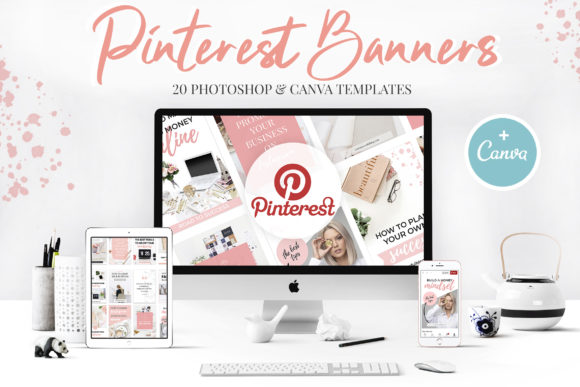
Pinterest is a visual search engine, and the "Pin" format is unique. Unlike the square orientation of Instagram or the landscape of Facebook, the vertical aspect ratio demands a specific approach to visual hierarchy. A well-designed pin guides the viewer’s eye from the top to the bottom, landing squarely on the call to action. The templates included in this pack are built on that fundamental principle. With a standard banner size of 735x1102px, these layouts are optimized for how users actually scroll on mobile devices.
The visual personality of these Pinterest banners strikes a balance between trendy and timeless. We aren't looking at fleeting fads that will look dated in six months. Instead, the style relies on clean lines, ample white space, and strategic placement of text overlays. This creates a professional look that signals credibility to potential customers. Whether you are a crafter showcasing a DIY project or a publisher promoting a new book, the layout does the heavy lifting, ensuring your message isn't lost in visual noise.
Flexibility Across Platforms: PSD vs. Canva
One of the standout features of this collection is its dual compatibility. In the modern design assets ecosystem, flexibility is key. You receive 20 .PSD templates for those who prefer the granular control of Adobe Photoshop. This is ideal for designers who want to manipulate layers, apply advanced blending modes, or integrate these pins into a larger, complex file structure.
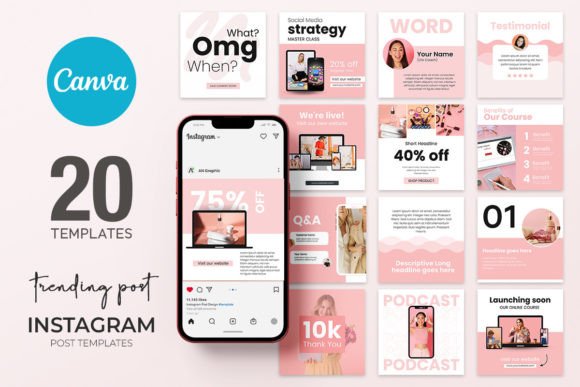
However, for the entrepreneur or blogger on the go, the inclusion of Canva.com links is a game-changer. Canva has democratized web design and social media graphics, allowing non-designers to create professional content without a steep learning curve. These templates allow you to drag and drop your own images and swap out text in seconds. It is important to note the specific instruction for the Canva files: while the text and images are fully editable, the colors and shapes in the Canva version are locked. This actually serves a practical purpose—it enforces a cohesive brand identity and ensures that the layout remains structurally sound, even if you are new to design principles.
Typography and Readability in Action
Visual hierarchy is heavily dependent on typography. A pin has only a split second to grab attention, and the contrast between headlines and body text is what drives that initial engagement. The Canva Pinterest Templates are designed to accommodate modern typography trends, specifically pairing bold, attention-grabbing headers with cleaner, more legible body copy.
The pack includes a file with links to free fonts and images, which is an incredible resource for maintaining consistency. When selecting your typeface, think about readability first. A display font or script font might look beautiful on a logo, but on a mobile screen, it needs to be legible at a glance. These templates suggest font pairings that have already been tested for legibility. You can mix a sans serif font for the call to action with a serif font for the title to create a sophisticated editorial look, or use a handwritten font for a more personal, boutique feel. The structure of the templates supports these choices, ensuring that your text doesn't crowd the edges or overlap critical design elements.
Workflow Efficiency and Brand Consistency
Time is the most expensive currency for a business owner. Creating pins from scratch for every new blog post or product launch is unsustainable. By using a premium font style and a pre-set layout, you create a system. You can batch-create content for the entire month in a single afternoon.
This consistency is vital for brand identity. When a user scrolls through their feed, they should be able to recognize your content by the layout alone before they even read the text. The professional aesthetic of these banners helps build that recognition. Whether you are working on packaging design, editorial design, or web design, having a unified visual language across all platforms builds trust. These templates provide that framework, allowing you to focus on the message rather than the margins.
Practical Application: Who Benefits?
The utility of these templates spans a wide range of industries. For the content creator or marketer, the ability to quickly generate high-quality graphics means you can capitalize on trends or timely topics without delay. If you are running a sale or a webinar, you can have a promotional banner ready in minutes.
For crafters and hobbyists, the visual appeal of the templates elevates your work. It presents your handmade goods or artistic projects with the same level of polish as a large corporation. This perceived professionalism can directly influence customer behavior, leading to higher click-through rates and more engagement. Even for logo design presentation, these vertical formats can be used to showcase mockups or brand story elements in a "behind the scenes" style that audiences love.
Getting Started and Best Practices
To get the most out of this pack, start by reviewing the instruction file. The most critical step—Make a Copy—cannot be overstated. This preserves the master file so you can reuse the templates indefinitely. Once you have your working copy, take a moment to evaluate your specific project needs.
Don't just change the text; consider the mood. If your brand is energetic, use the .PSD templates to apply bold color overlays. If your brand is minimalist, stick to the black and white options and let the whitespace do the talking. Test different images. A lifestyle shot often performs better than a plain product photo on Pinterest because it helps the user visualize the product in their own life.
Ultimately, these Canva Pinterest Templates are more than just files; they are a toolkit for visual communication. They bridge the gap between a professional creative font aesthetic and the practical need for speed. By integrating these assets into your workflow, you ensure that your Pinterest presence is not only active but visually compelling, driving the traffic and attention your brand deserves.